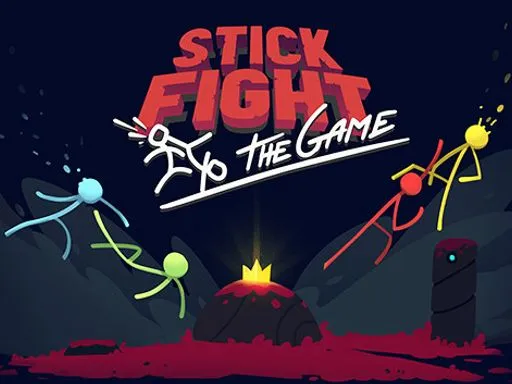
Stick Fight

Rating:
4.67
Played:
29,571
Stick Fight turns a simple idea into lively chaos: tiny stick figures, big weapons, and quick rounds where one good hit can flip the whole match. If you like action that starts fast and ends faster, Stick Fight is an easy pick. You can play Stick Fight in your browser on playstickfight.com, so you can jump in without downloads.
What Is Stick Fight?
Stick Fight is a fast arena fighting game where you control a stick figure and try to be the last one standing. Matches are built around movement, timing, and a little bit of luck. Weapons show up, platforms shift, and explosions can send players flying. Because the characters are simple and the rules are clear, Stick Fight is easy to understand even when the screen gets busy.
The core loop stays the same in most versions of Stick Fight. You spawn into a small stage, grab whatever weapon is nearby, and fight until one player is left. Some rounds end with a clean headshot. Others end with a hilarious chain reaction that nobody planned. That mix of skill and surprise is the real hook.
Play Stick Fight in Your Browser
For the quickest start, play Stick Fight on playstickfight.com. Browser play is great when you want a short break game that still feels competitive. Most browser builds run directly in a single tab, and you can usually switch to fullscreen for better focus.
A simple setup checklist for Stick Fight:
- Open playstickfight.com and launch the game.
- Click the game window so your keyboard and mouse inputs are captured.
- Look for a Controls or Settings screen, since keybinds can differ by version.
If your game feels choppy, closing heavy tabs helps. Keeping only the game tab open can make Stick Fight feel much smoother.
How to Control Stick Fight
Controls depend on the specific build, but the basics are consistent: move, jump, aim, attack, block, and throw or drop weapons.
Common controls you will see
A popular keyboard layout uses WASD for movement and jumping, left click to punch or shoot, right click to block, and a separate key such as F to throw weapons. Many browser versions use something close to that, sometimes with arrow keys instead of WASD, or a different throw key. If your version supports remapping, keep jump on a comfortable key and keep throw close to your movement keys, because throwing at the right moment can win rounds.
Control tips that matter
In Stick Fight, movement is offense and defense at the same time. Use short hops when you are close to an opponent, and avoid long jumps near the edge. Aim at where your opponent will land, not where they are standing. If blocking is available, use it to survive bursts, then move again so you do not become an easy target.
Game Origin and Why Stick Fights Became Popular
Stick figure fights grew online long before modern game engines. In the Flash era, simple stick characters made it easy for creators to animate dramatic action with very little art. Big stick fight animations helped shape the style into something instantly recognizable: clean silhouettes, fast motion, and exaggerated knockback that looks funny even when it is intense.
As the style spread, stick figure action shifted from short animations into interactive games. Small arenas, quick rounds, and readable silhouettes were perfect for browser play. That design DNA still shows up in Stick Fight today.
Modern Stick Fight games became known for physics based combat, interactive stages, and lots of weapons, often supporting local or online multiplayer. The result is a party game feeling where every round is short, and every match creates stories you will retell later.
Simple Strategy for Winning More
You do not need a complicated guide to improve at Stick Fight. Focus on three habits.
First, protect the center. Edges look tempting, but knockback is brutal. Staying near the middle gives you room to dodge and recover.
Second, pick weapons that match the moment. Explosives are great when an opponent is near a ledge. Fast firing weapons shine when you can keep distance. Heavy melee tools can end a round quickly, but they usually need good timing.
Third, control the tempo. Do not attack nonstop. Apply pressure, pause to bait a jump or panic block, then punish the landing. Even in a chaotic match, you can create predictable moments.
Stick Fight FAQ
Is Stick Fight free?
On playstickfight.com, Stick Fight is designed for quick browser play. Whether it is fully free can depend on the exact version and how the site is set up, but the goal is to keep the entry barrier low.
Can I play Stick Fight on mobile?
Some versions work on mobile browsers, but many feel best with keyboard and mouse. If touch controls feel awkward, try Stick Fight on a desktop.
Does Stick Fight have single player?
Many Stick Fight versions focus on multiplayer. Some browser builds include bots or challenge modes, so check the menu to see what is available.
Why does my character slide so much?
Stick Fight often uses physics style movement. Sliding and bouncing are part of the feel. Try shorter taps on movement keys and avoid over jumping.
How do I pick up or throw weapons?
Most builds pick up weapons when you touch them. A dedicated key usually throws or drops the current weapon. If you are unsure, open the Controls screen inside the game.
What is the best weapon?
There is no single best weapon in Stick Fight. Arena layout and spawns change every round. The best choice is the one that fits your position right now.
How do I reduce lag in browser matches?
Close extra tabs, keep your browser updated, and use a stable connection. Stick Fight feels much better when inputs are instant.
If you want a quick brawler that is easy to learn and always ready for one more round, play Stick Fight on playstickfight.com and start practicing your timing.
Comments
Loading comments…